

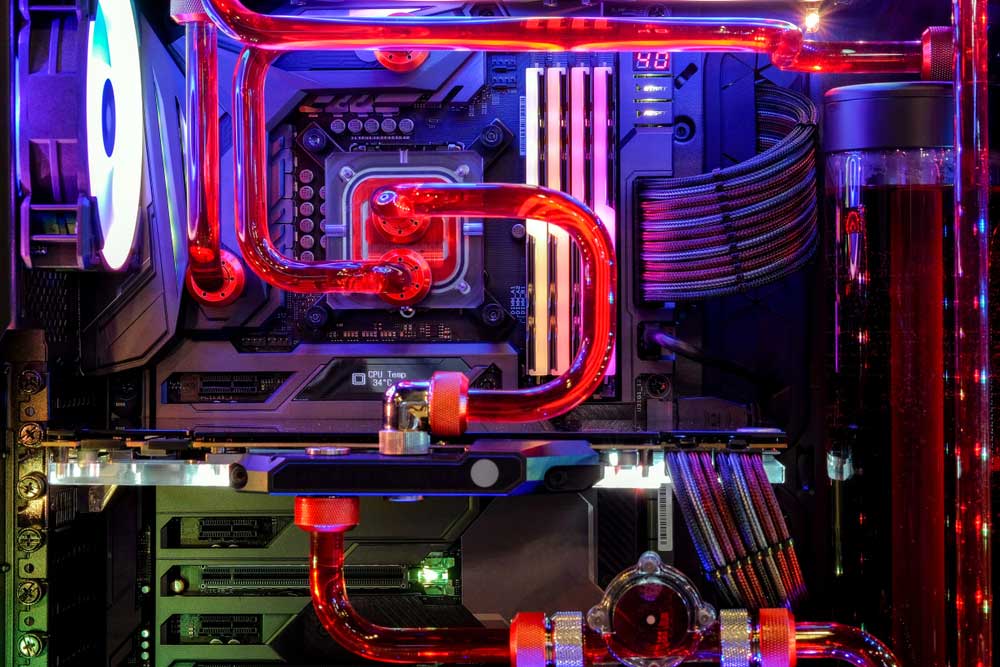
Gaming in the Valley can be demanding on a PC. Long sessions, high-performance GPUs, fine desert dust, and rooms that already struggle with summer heat can expose weaknesses in cooling, airflow, component selection, and system design.
If you are shopping for a gaming computer in Phoenix in 2026, the choice is not simply between different processors and graphics cards. It is also between buying a standardized system off a shelf and getting a PC configured around how, where, and what you actually play.
Quick answer: A custom gaming PC can give local gamers more control over performance, cooling, upgradeability, component quality, and budget than many mass-market configurations. A locally built system also gives you the opportunity to discuss your games, monitor resolution, performance targets, room conditions, and future upgrades before components are selected.
What local gamers should know
-
A gaming PC should be designed around the games, resolution, refresh rate, and other applications you actually use rather than the longest specification list.
-
Phoenix-area heat makes sensible airflow and cooling especially relevant for systems used during long gaming sessions.
-
Desert dust can accumulate in filters, fans, heatsinks, and cases, making case design and routine cleaning worth considering.
-
A balanced CPU and GPU combination is generally more useful than overspending on one component while compromising elsewhere.
-
Local support can simplify future conversations about troubleshooting, upgrades, cleaning, and hardware changes.
Why Does Buying a Custom Gaming PC Matter in Phoenix?
Buying a custom gaming PC matters in Phoenix because local conditions make cooling, airflow, dust management, and component balance practical considerations alongside raw gaming performance. A computer that looks impressive on a retail specification sheet may not necessarily be configured for your particular games, display, room, workload, or upgrade plans.
Summer conditions across Maricopa County can put additional focus on heat management. Your PC creates its own heat while operating, and that heat has to move efficiently through the case and into the surrounding room.
Dust is another consideration in the Sonoran Desert. Homes in areas from Ahwatukee and Arcadia to North Phoenix can experience airborne dust that eventually reaches PC filters and cooling components.
GeekForce.biz works with local computer users, and when we discuss a gaming build, the useful starting point is what the computer actually needs to accomplish. Component choices should follow the intended use rather than the other way around.
What Local Conditions Should Phoenix Gamers Consider?
Phoenix gamers should pay particular attention to ambient room temperature, desert dust, PC placement, ventilation, and the length and intensity of typical gaming sessions. These factors do not replace normal hardware considerations, but they can affect how a gaming computer should be configured and maintained.
National Weather Service information for the region documents the extreme summer heat associated with the Valley. That does not mean every gaming PC needs exotic cooling. It does mean cooling decisions should be made deliberately rather than treated as an afterthought.
A PC placed under a desk with restricted airflow may behave differently from the same machine in an open, air-conditioned room. Likewise, clogged intake filters can gradually restrict airflow.
For local gamers, good system design starts with realistic operating conditions.
How Can Local Conditions Affect Gaming PC Performance?
Local conditions can affect a gaming PC by increasing the importance of efficient heat removal, clean airflow, and regular maintenance. High-performance processors and graphics cards generate heat under load, so the cooling system needs a practical path for bringing cooler air in and moving warmer air out.
This matters whether you are gaming near Downtown Phoenix, attending Arizona State University in Tempe, or setting up a dedicated gaming room elsewhere in the Valley.
Thermal management is not only about adding more fans. Case layout, fan orientation, CPU cooling, GPU clearance, cable management, and component selection all play roles.
A thoughtfully configured PC can also make maintenance easier because filters, fans, storage drives, and other components remain accessible.
What Warning Signs Suggest a Gaming PC Needs Attention?
A gaming PC may need attention when performance, temperature behavior, fan noise, stability, or startup behavior changes noticeably from its normal operation. One symptom does not automatically identify a failed component, but repeated problems are worth investigating before buying replacement hardware at random.
Watch for:
-
Games suddenly running at significantly lower frame rates than expected.
-
Fans becoming unusually loud during workloads that were previously quiet.
-
Unexpected shutdowns or restarts during gaming.
-
Visual artifacts, crashes, or repeated driver-related problems.
-
Heavy dust buildup around case vents and filters.
-
Games or applications taking unusually long to load despite adequate hardware.
-
Storage space repeatedly running out.
-
A system that no longer meets the requirements of the games or software you want to use.
When Should You Call a Professional About a Gaming PC?
Professional PC help makes sense when troubleshooting involves uncertain hardware failures, repeated crashes, component compatibility, cooling problems, major upgrades, or a complete new build. Basic filter cleaning and software updates may be manageable at home, but replacing expensive components without identifying the actual problem can create unnecessary cost.
For gamers around Scottsdale, Mesa, Chandler, and Glendale, a professional assessment can also be useful before a major upgrade.
For example, a new graphics card may require more than simply installing the card. Power supply capacity, physical clearance, processor balance, display resolution, cooling, and available connectors can all matter.
What Common Problems Affect Gaming PCs in the Valley?
Common gaming PC problems in the Valley can include dust accumulation, insufficient airflow, aging components, poorly balanced hardware, limited storage, and systems that were not designed around the owner’s actual gaming goals. These issues can overlap, which is why troubleshooting should focus on the complete system.
1. Dust buildup: Desert dust can collect on intake filters, fans, heatsinks, and internal surfaces.
2. Restricted airflow: Furniture, walls, carpet, or an enclosed desk area can limit ventilation around a case.
3. Unbalanced components: An expensive GPU paired with other limiting hardware may not deliver the improvement a buyer expected.
4. Aging storage or insufficient capacity: Modern game libraries can consume substantial storage, making capacity planning important.
5. Upgrade limitations: Some prebuilt systems may use cases, power supplies, cooling arrangements, or other components that make future changes less straightforward.
How Should Phoenix Gamers Maintain a Custom PC?
Phoenix gamers should keep vents unobstructed, inspect dust filters regularly, monitor unusual changes in temperature or fan behavior, and schedule deeper cleaning based on the environment around the computer. A house with pets or frequent dust exposure may require attention more often than a cleaner, tightly controlled room.
Place the tower where air can circulate around its intake and exhaust areas. Avoid allowing filters to become heavily clogged, and shut the computer down properly before performing physical cleaning.
Before summer, it can also be useful to check that fans are operating normally and vents are clear.
DIY maintenance should stop when you are unsure how to safely remove components, diagnose electrical or hardware faults, or disassemble cooling equipment.
What Results Should You Expect From a Well-Planned Gaming Build?
A well-planned gaming build should provide performance appropriate to your chosen games and display while leaving sensible room for cooling, storage, maintenance, and future upgrades. The goal is not necessarily to buy the most expensive hardware available. It is to spend money where it meaningfully supports the experience you want.
A competitive esports player using a high-refresh-rate monitor may prioritize components differently from someone playing graphically demanding single-player games at higher resolutions.
Streaming, video editing, schoolwork, content creation, virtual reality, and multiple-monitor setups can change the ideal configuration again.
What Mistakes Should Local Gaming PC Buyers Avoid?
Local buyers should avoid choosing a gaming PC solely by brand name, RGB lighting, one headline component, or the assumption that a higher total price automatically creates a better-balanced system. A good purchase starts with workload and performance goals, followed by compatible components that support those goals.
Mistake: Focusing only on the graphics card.
Consequence: Other components may not adequately support the intended setup.
Better approach: Evaluate the CPU, GPU, memory, storage, power supply, cooling, case, and monitor together.
Mistake: Ignoring airflow.
Consequence: A powerful build may run hotter or louder than expected.
Better approach: Select the case and cooling configuration as part of the build.
Mistake: Buying for specifications you will never use.
Consequence: Budget gets diverted from upgrades that could matter more.
Better approach: Build around actual games and applications.
What Does a Common Local Gaming PC Scenario Look Like?
A common local scenario is a gamer who wants better performance and initially assumes that replacing one major component will solve everything. After looking at the complete system, other considerations such as power capacity, processor performance, case clearance, cooling, storage, or monitor resolution may also influence the best upgrade path.
This is a representative scenario, not a specific GeekForce.biz customer case study.
For a Valley gamer, evaluating the entire system before purchasing expensive hardware can reduce the chance of ending up with components that do not work together as expected.
What Gaming PC Solutions Can a Local Computer Professional Provide?
Gaming PC solutions can include build planning, component selection, custom assembly, upgrades, troubleshooting, maintenance, and recommendations based on the user’s actual performance goals. The exact solution should depend on the existing computer, budget, games, monitor, and intended lifespan of the system.
At GeekForce.biz, we can help local gamers think through those variables rather than treating a gaming computer as a one-size-fits-all purchase.
Is a Custom Build Better Than a Big-Box Gaming PC?
A custom build can be the better choice when you value component selection, upgrade planning, cooling choices, and a system tailored to your workload, while a big-box PC can appeal to buyers who prioritize a standardized, ready-to-purchase configuration. Neither category should be judged by the label alone, so compare the actual components and design.
Look beyond CPU and GPU model names. Compare the power supply, motherboard, memory configuration, storage, case ventilation, cooling hardware, available expansion space, and upgrade accessibility.
For buyers who want to understand exactly where their budget is going, a custom configuration provides more opportunity to make those decisions intentionally.
Where Can Local Gamers Get Help With Custom Gaming PCs?
Phoenix gamers can seek local PC help when they want a new custom build, an upgrade assessment, or troubleshooting for an existing gaming computer. Nearby gamers from Tempe, Scottsdale, Mesa, Chandler, Glendale, and other parts of the Valley may have similar concerns about performance, cooling, and upgrade planning.
Service availability for a specific location should be confirmed when scheduling.
What Can Happen If You Ignore Gaming PC Problems?
Ignoring repeated crashes, excessive dust, abnormal fan behavior, or persistent performance problems can allow a manageable issue to become more disruptive or make troubleshooting harder later. Continuing to buy upgrades without diagnosing the system can also result in spending money without addressing the actual limitation.
In a hot, dusty region, routine attention to airflow and cleanliness is a practical part of owning performance hardware.
FAQ
How much should I spend on a custom gaming PC in Phoenix?
The right budget depends on your games, monitor resolution, desired frame rate, and whether the computer will also handle streaming, editing, school, or professional workloads. Instead of choosing a price first and maximizing every specification, identify your performance goals and allocate the budget toward the components that support them.
Does Phoenix heat affect a gaming PC?
Phoenix heat can make room temperature and effective cooling more relevant, especially during long gaming sessions. The PC still depends primarily on its own cooling design, but warmer surroundings can reduce the temperature difference available for heat transfer. Good airflow, clean vents, and appropriate cooling are sensible priorities.
How often should I clean a gaming PC in Arizona?
Cleaning frequency in Arizona should depend on visible dust buildup and the environment around the PC rather than an arbitrary schedule. Homes with pets, frequent dust exposure, or quickly dirty filters may need more frequent attention. Inspect accessible filters and vents regularly and avoid opening or removing components you are not comfortable handling.
Can I upgrade my existing gaming PC instead of replacing it?
Yes, many gaming PCs can be upgraded if the existing motherboard, power supply, case, cooling system, and other components can support the new hardware. A Phoenix-area gamer considering a GPU or CPU upgrade should evaluate the entire configuration first rather than assuming a new component will be compatible or solve the performance issue.
Is liquid cooling necessary for a gaming PC in Phoenix?
Liquid cooling is not automatically necessary just because a gaming PC is located in Phoenix. The appropriate cooling solution depends on the processor, workload, case airflow, noise preferences, room conditions, and other design factors. A properly selected air-cooling setup can also be appropriate for many configurations.
Is a locally built gaming PC easier to upgrade?
A custom local build can be planned with future upgrades in mind by selecting compatible, accessible components and leaving appropriate capacity where useful. Upgradeability still depends on the specific motherboard, case, power supply, cooling system, and platform, so buyers should discuss likely future changes during the initial planning process.
Should Scottsdale or Tempe gamers worry about desert dust?
Scottsdale and Tempe gamers should account for desert dust because airborne particles can eventually collect around PC filters, fans, and cooling surfaces. The amount varies significantly by home and PC placement. Keeping the tower away from obvious dust sources and inspecting filters periodically can help maintain unrestricted airflow.
What should I bring when discussing a custom gaming PC build?
Bring your approximate budget, the games you play, your monitor specifications, and details about any other applications you regularly use. It also helps to explain whether you plan to stream, edit video, use VR, add monitors, or upgrade later. Those details make component recommendations more relevant to your actual setup.
Build a Gaming PC Around the Way You Play in Phoenix
A gaming computer should make sense as a complete system, not just a collection of impressive component names. For local gamers dealing with Valley heat, desert dust, demanding games, and evolving performance needs, careful component selection and cooling design can make a custom build a practical alternative to an off-the-shelf PC.
Get a Phoenix Gaming PC Built for Your Goals
We can help you evaluate the performance, cooling, compatibility, and upgrade considerations that matter for your setup.